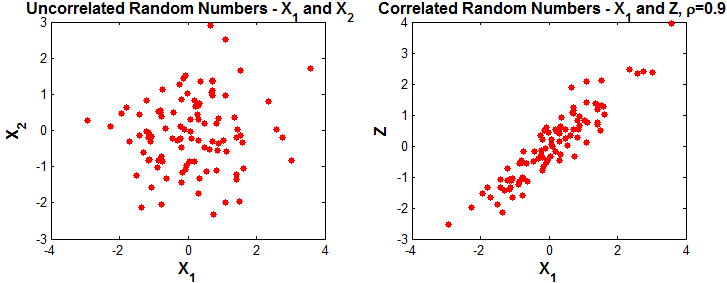
This article discusses the method of generating two correlated random sequences using Matlab. If you are looking for the method on generating multiple sequences of correlated random numbers, I urge you to go here.
Generating two vectors of correlated random numbers, given the correlation coefficient $latex \rho $, is implemented in two steps. The first step is to generate two uncorrelated random sequences from an underlying distribution. Normally distributed random sequences are considered here.
Step 1: Generate two uncorrelated Gaussian distributed random sequences $latex X_1, X_2 $
x1=randn(1,100); %Normal random numbers sequence 1
x2=randn(1,100); %Normal random numbers sequence 2
subplot(1,2,1); plot(x1,x2,'r*');
title('Uncorrelated RVs X_1 and X_2');
xlabel('X_1'); ylabel('X_2');
Step 2: Generate correlated random sequence z
In the second step, the required correlated sequence is generated as
$latex Z=\rho X_1 + \sqrt{1-\rho^2} X_2 $
rho=0.9;
z=rho*x1+sqrt(1-rhoˆ2)*x2;%transformation
subplot(1,2,2); plot(x1,z,'r*');
title(['Correlated RVs X_1 and Z , \rho=',num2str(rho)]);
xlabel('X_1'); ylabel('Z');
The resulting sequence Z will have $latex \rho $ correlation with respect to $latex X_1 $
Results plotted below.